
Introduction
The internet has become a major part of everyday life. People use online platforms for banking, shopping, education, communication, and business activities. While technology makes life easier, it also increases the risk of cyber threats. Hackers and cybercriminals constantly search for weak systems to steal personal data, financial details, and sensitive information. That is why learning effective cyber attack prevention methods is more important than ever.
Many internet users believe cyber attacks only target large companies. However, individuals, students, freelancers, and small businesses are also common victims. A single weak password or suspicious email can expose important data and cause financial loss. Fortunately, simple online safety habits can greatly reduce these risks.
Cyber attack prevention is not only for IT professionals. Anyone can improve cybersecurity by following practical and easy steps. Strong passwords, updated software, secure browsing, and awareness of online scams can protect users from most digital threats. These techniques are simple to apply and highly effective.
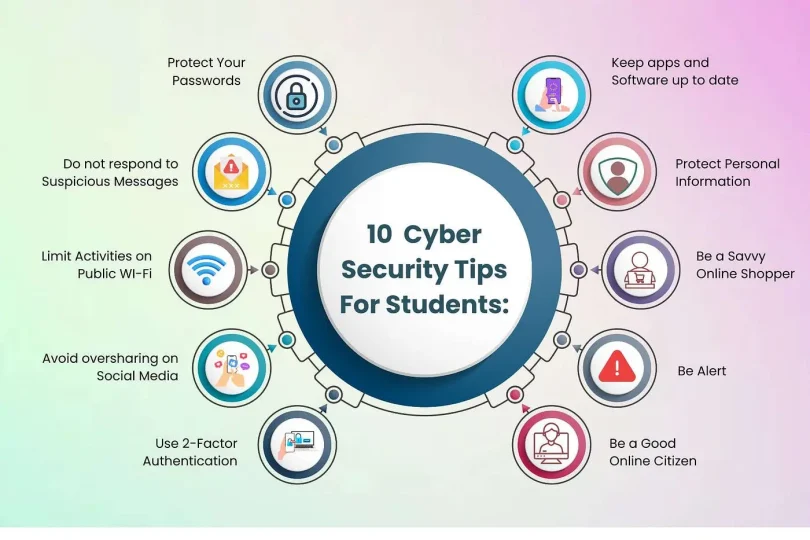
In this guide, you will learn the top 10 cyber attack prevention tips to stay safe online. The article explains each tip in detail using beginner-friendly language and practical examples. Whether you are new to cybersecurity or want to improve your online protection, these tips will help you browse the internet safely and confidently.
What is Cyber Attack Prevention?
Cyber attack prevention refers to the methods and practices used to protect devices, networks, accounts, and personal information from hackers and online threats. It includes security measures designed to stop unauthorized access, malware infections, phishing scams, and data theft before damage occurs.
Cyber attacks can happen in many forms. Some attackers send fake emails to steal passwords, while others use malicious software to access devices remotely. There are also ransomware attacks that lock files until money is paid. Cyber attack prevention focuses on reducing these risks through awareness, security tools, and safe online behavior.
Modern cybersecurity strategies combine technology and user awareness. Antivirus programs, firewalls, encryption, and software updates are technical defenses. At the same time, users must recognize suspicious links, avoid unsafe websites, and protect login credentials. Together, these practices create a stronger defense against online threats.
Why is Cyber Attack Prevention Important?

Cyber attack prevention is important because cybercrime continues to grow worldwide. Every day, millions of people face phishing attempts, malware infections, identity theft, and online fraud. Without proper protection, sensitive information can easily fall into the wrong hands.
A successful cyber attack can create serious problems. Personal photos, banking information, passwords, and business documents may be stolen or deleted. Some victims lose money, while others experience privacy violations or damaged reputations. Businesses may also suffer legal issues and financial losses after data breaches.
Prevention is always better than recovery. Once hackers access an account or device, fixing the damage can take time and money. By following smart cybersecurity habits, users can avoid many common threats before they become dangerous. Strong online security also improves confidence while browsing, shopping, or communicating online.
Detailed Step-by-Step Guide
1. Use Strong and Unique Passwords
Passwords are the first line of defense against hackers. Weak passwords make it easy for attackers to access accounts through guessing or automated tools. Many users still use simple passwords such as “123456” or their names, which are highly insecure.
Create passwords that include uppercase letters, lowercase letters, numbers, and special characters. Avoid using personal details like birthdays or phone numbers. A strong password should be difficult to predict and at least 12 characters long.
It is also important to use different passwords for every account. If one password gets leaked, other accounts remain protected. Password managers can help store and organize complex passwords safely.
2. Enable Two-Factor Authentication
Two-factor authentication adds an extra layer of security to online accounts. Even if someone steals your password, they still need a second verification step to log in.
This extra step may include a code sent to your phone, an authentication app, or fingerprint verification. Many major platforms now offer two-factor authentication as a free security feature.
Enabling this protection significantly reduces the risk of unauthorized access. It is especially important for email accounts, banking apps, and social media platforms where sensitive information is stored.
3. Keep Software and Devices Updated
Outdated software often contains security vulnerabilities that hackers can exploit. Software companies regularly release updates to fix bugs and improve security.
Ignoring updates can leave your device exposed to cyber threats. This includes operating systems, browsers, mobile apps, and antivirus programs. Enabling automatic updates is one of the easiest ways to stay protected.
Updated software also improves performance and compatibility. By keeping systems current, users reduce the chances of malware attacks and unauthorized access.
4. Avoid Suspicious Emails and Links
Phishing attacks are one of the most common cyber threats today. Attackers send fake emails or messages that appear legitimate in order to steal passwords or financial information.
Always check the sender’s email address carefully. Be cautious of messages asking for urgent action, personal details, or financial information. Avoid clicking unknown links or downloading suspicious attachments.
For example, a fake banking email may ask you to verify your account through a fraudulent website. Instead of clicking the link, visit the official website directly through your browser.
5. Install Reliable Antivirus Software
Antivirus software helps detect and block malware, spyware, and other harmful programs. It scans files, monitors suspicious activity, and prevents dangerous downloads.
Choosing a trusted antivirus solution adds an important layer of cybersecurity protection. Many modern antivirus tools also include phishing protection and firewall features.
Regular scans are essential to identify threats early. Even careful internet users can accidentally encounter malicious files, making antivirus software an important safety tool.
6. Use Secure Wi-Fi Connections
Public Wi-Fi networks in cafes, airports, and shopping centers are often less secure than private networks. Hackers may use these networks to intercept data and monitor online activity.
Avoid accessing banking accounts or entering passwords on public Wi-Fi whenever possible. If necessary, use a virtual private network to encrypt your internet connection.
At home, protect your Wi-Fi network with a strong password and updated router settings. Changing the default router password also improves network security.
7. Backup Important Data Regularly
Data backups are essential in case of ransomware attacks, device failures, or accidental deletion. Without backups, recovering lost files may become impossible.
Store backups on external drives or trusted cloud storage platforms. Automatic backup systems make the process easier and more reliable.
For example, if malware damages your computer, backup copies allow you to restore important documents and photos quickly without paying cybercriminals.
8. Be Careful with Social Media Sharing
Oversharing personal information online can increase cybersecurity risks. Hackers often gather details from social media profiles to guess passwords or create phishing scams.
Avoid posting sensitive information such as addresses, phone numbers, travel plans, or financial details publicly. Review privacy settings regularly to control who can see your content.
Being mindful of online sharing helps reduce identity theft risks and protects personal privacy from cybercriminals.
9. Download Files Only from Trusted Sources
Many malware infections happen through unsafe downloads. Fake apps, pirated software, and suspicious websites may contain harmful code.
Only download software, games, or files from official websites and trusted platforms. Read reviews and check permissions before installing applications on your device.
For mobile devices, use official app stores whenever possible. Trusted sources reduce the chances of downloading infected or fake applications.
10. Educate Yourself About Cybersecurity
Cyber threats continue to evolve every year. Staying informed about new scams and security practices is one of the best ways to stay protected online.
Read cybersecurity articles, follow technology news, and learn how modern attacks work. Awareness helps users identify suspicious activity before becoming victims.
Families and businesses should also educate children and employees about online safety. A well-informed user is far less likely to fall for common cyber attacks.
Benefits of Cyber Attack Prevention
Cyber attack prevention offers many advantages for both individuals and businesses. Strong cybersecurity practices improve digital safety and reduce online risks.
- Protects personal and financial information
- Reduces the risk of identity theft
- Prevents malware and ransomware infections
- Improves privacy and online security
- Protects business reputation and customer trust
- Reduces financial losses from cybercrime
- Helps maintain device performance
- Increases confidence while browsing online
- Prevents unauthorized account access
- Supports safe online communication
Disadvantages / Risks
Although cybersecurity protection is essential, there are still some challenges and limitations users should understand.
- Advanced cyber attacks can still bypass security measures
- Some security tools require paid subscriptions
- Frequent updates may feel inconvenient
- Weak user awareness can create vulnerabilities
- Poor password management remains a common issue
- Public networks still carry risks despite precautions
- Fake security software can harm devices
- Data recovery may still be difficult after severe attacks
Common Mistakes to Avoid
One of the biggest cybersecurity mistakes is using the same password for multiple accounts. If hackers gain access to one account, they can easily target others using the same credentials. Always create unique passwords for different platforms.
Another common mistake is ignoring software updates. Many users delay updates because they seem unnecessary or time-consuming. However, updates often fix important security flaws that protect against modern cyber threats.
Clicking suspicious links is also a major problem. Cybercriminals create convincing fake messages to trick users into revealing sensitive information. Always verify emails and websites before sharing personal data.
Some people believe antivirus software alone provides complete protection. While security software is helpful, safe online behavior is equally important. Users must stay alert and practice responsible internet habits.
FAQs
What is the most common type of cyber attack?
Phishing attacks are among the most common cyber threats. Attackers send fake emails or messages designed to steal passwords, financial details, or personal information.
How can I tell if a website is secure?
Secure websites usually use HTTPS instead of HTTP. You may also see a lock icon in the browser address bar, indicating encrypted communication.
Is free antivirus software good enough?
Some free antivirus programs offer basic protection, but paid versions often provide advanced features such as ransomware protection, firewalls, and phishing detection.
Why are software updates important for cybersecurity?
Software updates fix security vulnerabilities that hackers may exploit. Keeping systems updated helps protect devices from malware and unauthorized access.
Can strong passwords really stop hackers?
Strong passwords make hacking much more difficult. Combined with two-factor authentication, they significantly improve account security.
What should I do if I receive a suspicious email?
Do not click any links or download attachments. Verify the sender carefully and delete the message if it appears suspicious or fraudulent.
Is public Wi-Fi dangerous?
Public Wi-Fi can expose users to cyber threats if the network is unsecured. Using a virtual private network adds extra protection while browsing.
How often should I back up my files?
Important files should be backed up regularly, preferably weekly or automatically. Frequent backups reduce data loss risks during cyber attacks or device failures.
Expert Tips & Bonus Points
Cybersecurity experts recommend reviewing account activity regularly. Unexpected login attempts or password reset notifications may indicate suspicious behavior. Acting quickly can prevent larger security issues.
Another useful tip is limiting app permissions on smartphones and computers. Some applications request unnecessary access to contacts, cameras, or files. Reviewing permissions improves privacy and reduces risks.
Using browser security settings also enhances protection. Modern browsers include tools that block unsafe websites and suspicious downloads. Enabling these features adds another layer of defense.
Parents should teach children about internet safety from an early age. Young users may unknowingly share sensitive information or click harmful links. Awareness and guidance help create safer online habits.
Businesses should create cybersecurity policies for employees. Simple rules regarding password management, email safety, and data handling can prevent many workplace security incidents.
Finally, remain cautious even when websites or messages appear professional. Cybercriminals constantly improve their tactics to trick users. Staying alert is one of the most effective cyber attack prevention strategies available today.
Conclusion
Cyber threats continue to increase as more people rely on digital technology for daily activities. From online banking and shopping to communication and remote work, internet usage has become unavoidable. Unfortunately, cybercriminals take advantage of weak security practices to steal information, spread malware, and damage systems. That is why cyber attack prevention should be a priority for every internet user.
The good news is that staying safe online does not require advanced technical skills. Simple actions such as using strong passwords, enabling two-factor authentication, updating software, and avoiding suspicious links can greatly reduce cybersecurity risks. These habits create strong protection against many common online threats.
Awareness is equally important. Cybersecurity is not just about installing antivirus software. It also involves understanding how cyber attacks work and recognizing warning signs before problems occur. Educated users are less likely to become victims of phishing scams, malware infections, or identity theft.
By following the top 10 cyber attack prevention tips discussed in this guide, individuals and businesses can improve online safety and protect valuable information. Strong cybersecurity habits not only prevent financial losses but also provide peace of mind while browsing the internet. As technology continues to evolve, maintaining safe online practices will remain essential for everyone in the digital world.